“AI presenters feel uncanny.”
A pixel character doesn't pretend to be a person. It's a mascot: clear, friendly and impossible to mistake for another channel.
Realistic AI presenters all look like the same person. A pixel avatar looks like yours. Build it once in the editor and it narrates every video, with the expression and pose each line calls for.

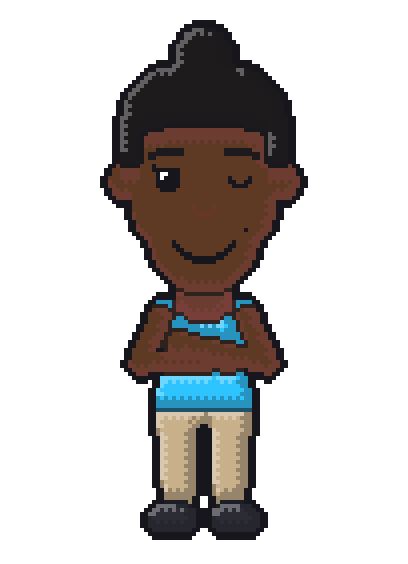
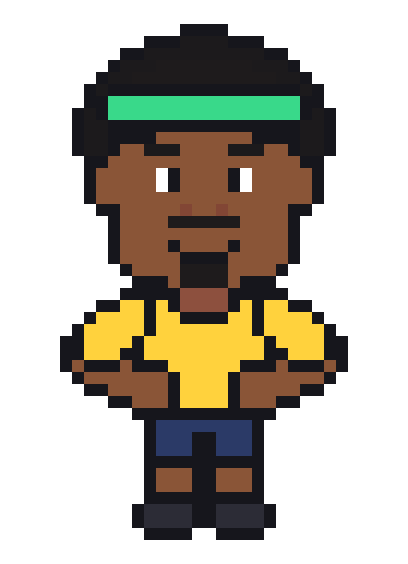
One avatar. Four styles.
“AI presenters feel uncanny.”
A pixel character doesn't pretend to be a person. It's a mascot: clear, friendly and impossible to mistake for another channel.
“I can't draw.”
You don't draw anything. You pick the face shape, hair, eyes, clothes and colors, and the engine draws every style from that.
“I want my channel to have a look.”
Pick one style and stay with it, or change it per video. The same character works from 8-bit to 64-bit.
8-bit, 16-bit, 32-bit and 64-bit, all from the same definition. A new style is new rendering rules, never new art.
8 expressions and 9 poses: talking, laughing, shouting, waving, pointing, thinking and more, matched to each line.
Each saved avatar carries its voice settings, so your host sounds the same in every video.
One job, start to finish. You bring the words, or just the idea. Bitfaceless does the voice, the scenes and the render.
Paste your script, or type one line and let the AI you picked write it. You edit every line before anything renders.
Your avatar reads the script with a local voice or your own ElevenLabs voice. The word timings drive the captions and the avatar's mouth.
Every line gets a motion-graphics scene: titles, lists, stats, comparisons, quotes, images. Your avatar picks up the matching pose and expression.
Preview in low resolution first, then render the final video with captions, music and sound effects. No watermark.
Build your avatar in the editor: face, hair, clothes, colors. It shows up in every video, so your channel has a face that isn't yours.
Render the same character in 8-bit, 16-bit, 32-bit or 64-bit, with 8 expressions and 9 poses.
Local voices or your own ElevenLabs voice. Word timings sync the captions and the mouth.
Titles, lists, stats, comparisons, quotes and images, drawn in your colors and fonts.
Type one line and get a full script with a hook, a body and a call to action. Or paste your own and keep every word.
Captions follow the narration word by word, straight from the voice timings.
Short videos at 15, 30 or 60 seconds, vertical for Shorts and Reels or horizontal for YouTube. Long videos of 3 to 12 minutes in chapters, and shorts cut from them.
Set the colors and fonts your scenes use. Rendered video never carries a Bitfaceless logo or watermark.
With local models, script to render works offline. Cloud tools are yours to turn on, with your own accounts.
$39 once, updates included, on 2 computers. Refund yourself within 7 days if it isn't for you.
One price, everything included. No subscription, no credits, no per-video fees.
$39once

7-day refund. Not for you? Refund yourself from your account, no email needed. Price in USD. Payments by Stripe.
Needs macOS 14 or later (Apple silicon) or Windows 10 or 11 (64-bit). Cloud AI (ElevenLabs, API keys, Claude Code or Codex) is optional and billed by those providers under your own account.
As close as the editor gets: face shape, skin, hair, glasses, facial hair, clothes. You can't upload a photo to generate one for now.
Yes. Save as many as you like and pick one per video.
You choose per video: in a corner, at the bottom, at the side, or as the whole scene.
Bitfaceless is a desktop app for Mac and Windows that turns a script or an idea into a finished narrated video. A pixel avatar you design hosts the video, with motion graphics, captions, music and sound effects around it. It's made for creators who don't want to be on camera.
Yes. Buy it here, then download it from your account for Mac and Windows. Your licence key activates it.
No. The avatar is the face and a synthetic voice reads the script. You write, or let the AI write, and you approve the script.
macOS 14 or later (Apple silicon) or Windows 10 or 11 (64-bit). Plan for extra disk space for the models you choose to download: each one shows its size before the download starts.
Yes, with local models. Once you download a local model for writing and a local voice, script to render needs no internet. Anything in the cloud (ElevenLabs, an API key, Claude Code, Codex) is something you turn on yourself.
You choose: a local model you download, the Claude Code or Codex CLI already installed on your computer, or your own Anthropic or OpenAI API key. The CLIs and API keys use your own plan with those providers.
No. Bitfaceless is $39 once and never charges per video. If you turn on a cloud provider, that provider bills you under your own account.
$39 once · 7-day refund · Mac and Windows